Buy the item, check the arrival, send the parcel
The easiest order to follow is the one with a saved product link, a clear option choice and a separate shipping budget.
How to use Hoobuy
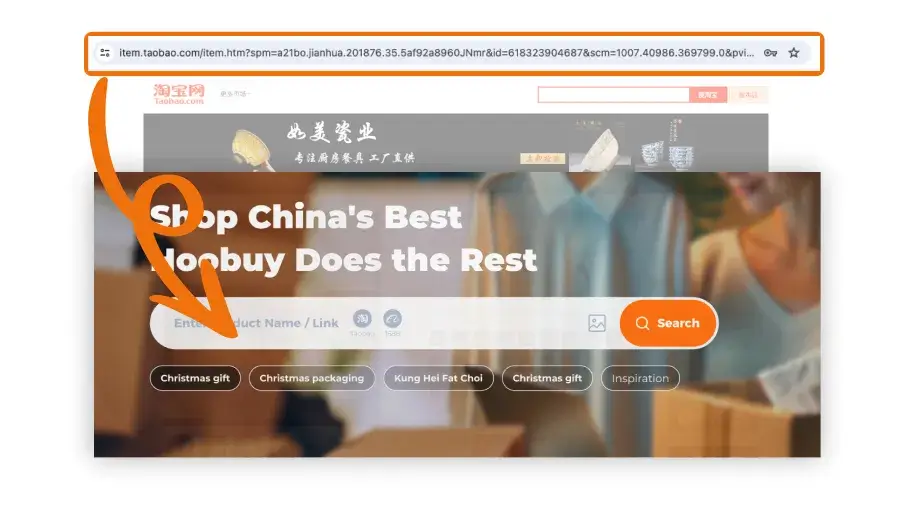
- Import your choice. Paste the seller URL into Hoobuy product search. Check the photograph and title, then select the same colour, size and quantity you saved.
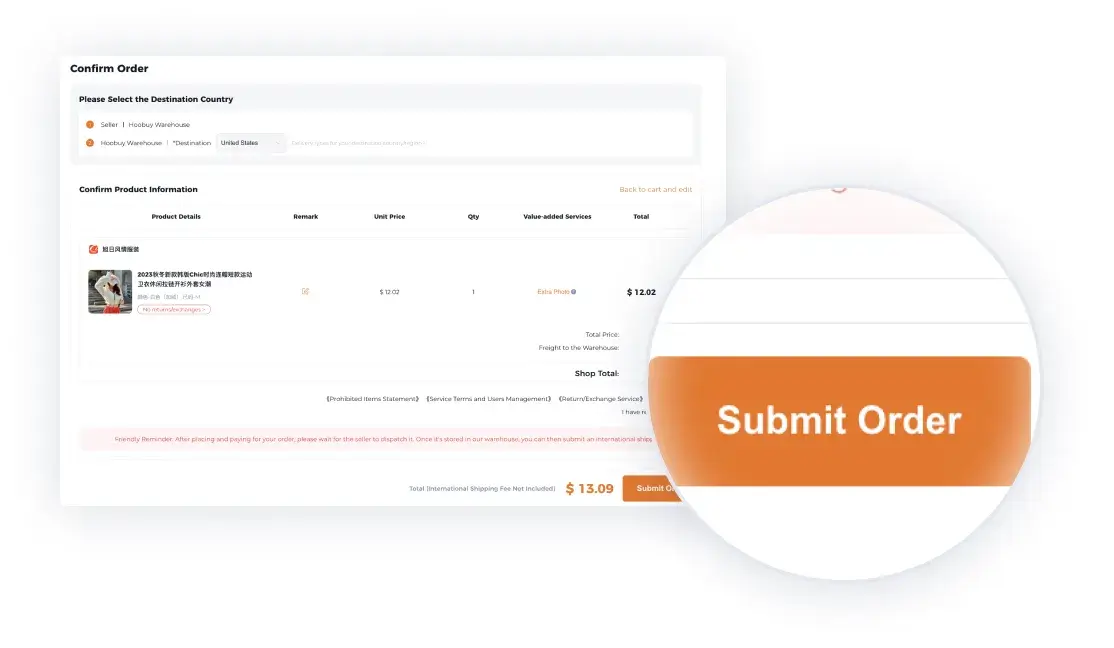
- Pay for the purchase. Read the item price, domestic delivery and other displayed charges. Keep the order reference after submitting payment.
- Review the warehouse item. In User Center, open the Warehouse record after receipt. Compare the delivered option and request a useful missing photo or measurement.
- Resolve a problem before shipment. Ask about return or exchange eligibility, cost and deadline while the item is still in the warehouse.
- Arrange and pay for the parcel. Select ready items, packing and a route that accepts your destination and contents. Review the full quote and declaration information.
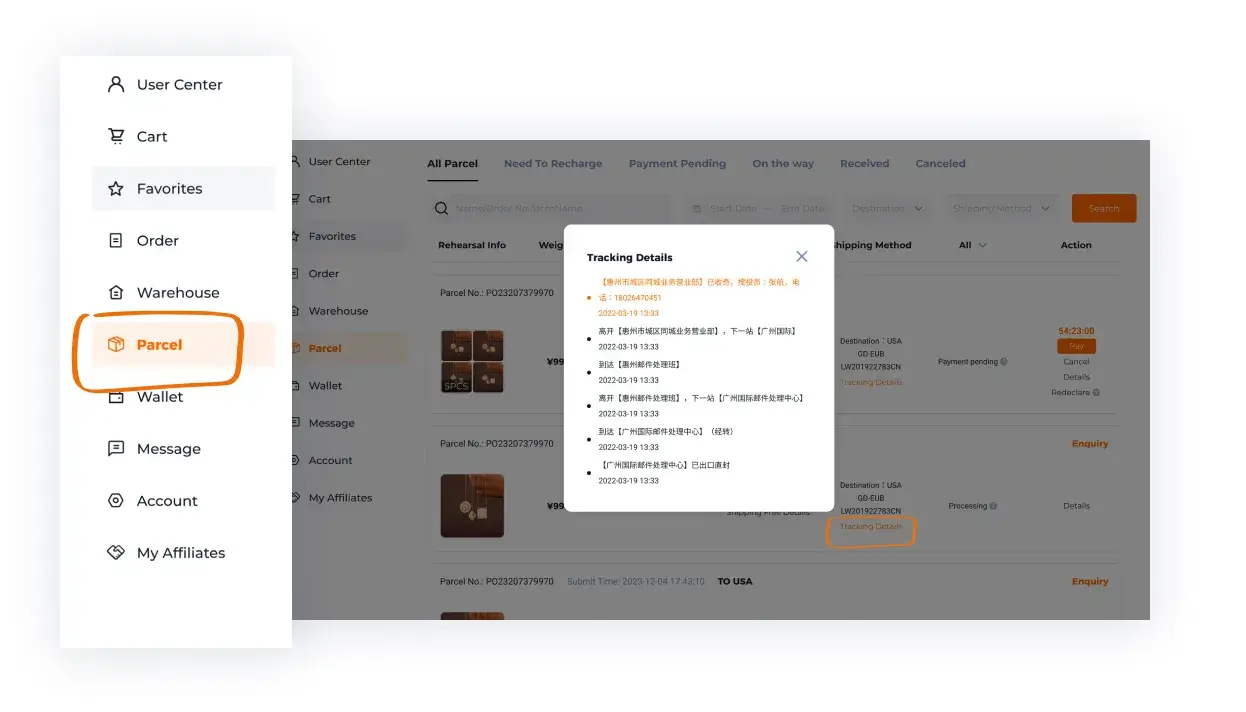
- Track and check delivery. Save the carrier number, follow delivery instructions and compare the contents with your order. Retain packaging and clear photos if something is wrong.
Put the right item into Hoobuy
Sign in to Hoobuy and paste the source URL into its product search. Compare the loaded photograph, title and variants with the original. Select the intended colour, size and quantity; add a useful note if a detail needs confirmation.
Check the purchase before you pay
Read the item cost, delivery from the seller to the China warehouse and other charges shown at payment. Save the order reference after submitting. If the agent needs a detail or the seller cannot supply the option, use the order enquiry rather than quietly substituting another product.
Hoobuy fees and the two payment stages
- Buying: product, Chinese domestic delivery and displayed purchase charges.
- Optional warehouse work: additional pictures, measurements or packing that you select.
- Shipping: your international route and chosen extras, based on the actual parcel.
- Destination: check any applicable import or carrier charges outside the quoted total.
Currency conversion before payment
Check the payable currency and any conversion or processing cost before confirming. Keep the actual charged amount in your budget. Another shopper’s exchange-rate screenshot is not the rate your payment provider must use.
What is QC?
QC means the inspection information and photographs for the received product. Use the Warehouse record in User Center to compare what arrived with the option you selected. The relevant reference is this item’s order, not a similar product photograph found elsewhere.
Visible checks can help with colour, labels, parts and damage. They cannot prove comfort, authenticity or hidden performance. Decide which question needs a photograph and which needs a seller or support answer.
How to check QC photos
Open User Center and the Warehouse area after receipt. Compare quantity, option and visible size markings with your saved order. Review the full item and any seam, fastening, print or measurement that matters.
If a view is missing, request the exact angle or measurement needed. For a wrong or damaged item, ask about return or exchange eligibility, the deadline and costs before you submit a parcel. QC photographs are useful for visible checks; they cannot guarantee authenticity, comfort or internal function.
How to use the tools in this Spreadsheet
Use the sizing converter to change centimetres and inches; compare the same measurement with a garment you own. Tick the warehouse prompts below as you review an arrival. The count records your reading progress temporarily—it does not send an account decision.
Keep your selected option and size notes handy when the photos arrive. Look at the full item first, then the details that could change your decision.
Choose packing for what is inside
Decide which ready items should travel together. Consider fragile parts, bulky boxes and category restrictions. Keep protective packaging where it serves the contents; do not remove it just to chase a smaller weight. Check the packed measurements used in the quote.
International shipping: choose and check the route
Compare the available lines for your destination and contents. Read the full price, expected transit range, tracking, restrictions and compensation conditions. Review declared information and selected packing before confirming.
Tracking and receiving your parcel
Save the parcel ID and carrier number after dispatch. For a delay, note the last scan and date before asking Hoobuy to investigate. Once the local carrier is handling delivery, follow its address or collection instructions.
When the parcel arrives, compare the contents with your order list. Retain the package and clear photos if anything is damaged or missing, then check the claim process promptly.
Find the right help for your issue